Metadata
- Source
- FLUID-118
- Type
- Bug
- Priority
- Critical
- Status
- Closed
- Resolution
- Cannot Reproduce
- Assignee
- N/A
- Reporter
- Justin Obara
- Created
2007-11-19T13:27:13.000-0500 - Updated
2014-05-26T15:39:36.989-0400 - Versions
-
- 0.5beta1
- 0.5
- 0.6beta1
- 0.6
- 0.7
- 0.8
- 1.0
- 1.1
- 1.1.1
- 1.1.2
- 1.2
- 1.3
- 1.3.1
- 1.4
- 1.5
- Fixed Versions
-
- 1.5
- Component
-
- Image Reorderer
- Layout Reorderer
- Reorderer
Description
Dragging an image offscreen or out of the frame has some unexpected results.
IE7: The image freezes and the cursor changes to a crossed out circle. When the mouse button is released, the image will snap back to its original location. Does not seem to happen when Fluid-101(http://issues.fluidproject.org/browse/FLUID-101) occurs.
FF: The image is still draggable; however, when the mouse button is released, the image is still held and can still be dragged. The button has to be clicked for it to be released, at which time it will snap back to it's original location or to a drop point if it is over top of one.
Environments
Firefox 2 (Mac OS 10.5, Win XP)
IE7 (Win XP)
FF4 (Win7)
Attachments
Comments
-
Jonathan Hung commented
2007-12-12T15:09:45.000-0500 Additional information:
- In IE when dragging out of bounds, the thumbnail will stick to the boundary where the mouse exited until the mouse returns to the div containing the Lightbox. When the mouse returns to the Lightbox div, the thumbnail snaps back to its original position.
May 28, 2008:
In FF2, it is possible to drag an orderable WAAAY off the screen. The horizontal scrollbar keeps expanding as user continues to move the mouse in a direction.
-
Justin Obara commented
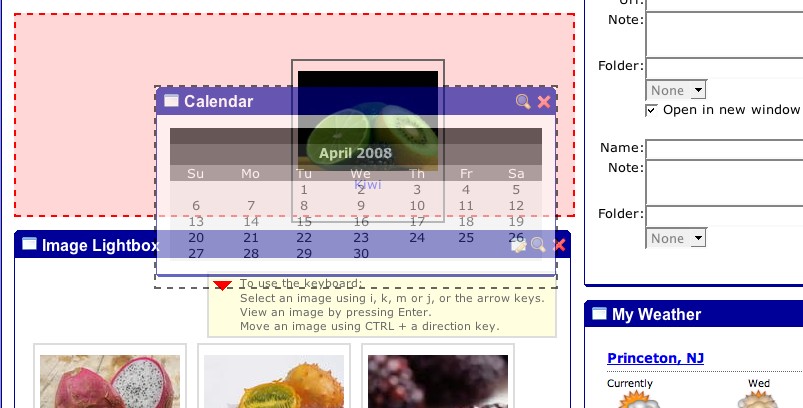
2008-07-18T12:39:05.000-0400 When there are nested reorderables, such as on the uportal demo page (http://build.fluidproject.org/fluid/sample-code/reorderer/portal/portal.html), this bug allows you to drag two avatars.
Steps to reproduce:
1) Go to the uPortal demo page from the daily buid site:
http://build.fluidproject.org/fluid/sample-code/reorderer/portal/portal.html2) Drag an element (fruit image) from the lightbox portal off screen and release the mouse
3) Place the pointer back on the screen and drag a portlet. Notice that you now have two avatars.
-
Justin Obara commented
2008-07-18T12:41:25.000-0400 'screenshot-1' shows the two avatars being dragged
-
Justin Obara commented
2008-08-13T13:33:23.000-0400 The IE7 behaviour does not appear to occur anymore.
Updated the Environments that the issue affects
-
Antranig Basman commented
2008-09-07T22:40:54.000-0400 It appears that the FIrefox side of the issue simply cannot be resolved - we do not obtain any notification of mouse events whilst the cursor is out of the browser bounds, and cannot even query the current button state. If you can verify the IE behaviour as ok, and can no longer demonstrate the "double avatar" phenomenon, we will have to sadly close this issue as "incomplete".
-
Justin Obara commented
2008-09-08T09:52:04.000-0400 The IE7 behaviour, as described in the description no longer occurs. However, the "double avatar' phenomenon is still reproducible
-
Justin Obara commented
2008-09-10T13:56:21.000-0400 The 'double avatar' no longer seems to be reproducible
-
Justin Obara commented
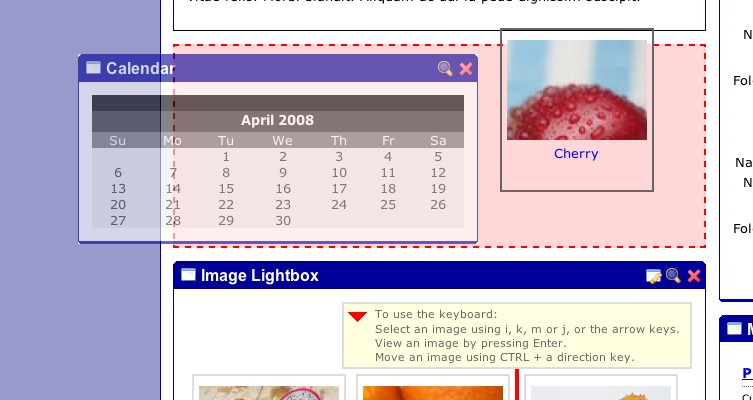
2008-09-11T12:32:49.000-0400 Okay I've managed to reproduce the "double avatar" issue. It works in reverse now. You need to pick up a portlet from the side so that when the avatar shrinks the pointer is left off of it( see Fluid-1334). You drag it out of the window and then can pick up an image from the lightbox portlet.
-
Justin Obara commented
2008-09-11T12:34:01.000-0400 'screenshot-2' shows a variant of the double avatar issue.
-
Eli Cochran commented
2008-09-25T18:28:37.000-0400 The behavior that I observed is a little different:
IE7: Drag off screen, the avatar becomes "decoupled" from the pointer so that when you drag the pointer back into the window the avatar lags behind until the avatar comes completely back into the window then it snaps back to the pointer.
Just noticed that this is written up as FLUID-894
-
Justin Obara commented
2014-05-26T15:39:36.975-0400 Couldn't reproduce in the latest supported browsers. This is likely do to changes in the new browsers, or refactoring to the Reorderer.